

Up to 40% off, limited timeTry Now

AI Video Generator Every Leading Video Model

Veo 3, Seedance, and more. Pick the model that fits today's shot.

AI Image Studio brings every top AI video generator onto one canvas. Switch models with a dropdown; your prompt and reference frames carry across so iterating is one click, not a re-render queue.

  • Every leading video model in one picker
  • Image-to-video starting frames
  • Premium and standard credits
  • Commercial-use license on paid plans
Every Leading Video Model
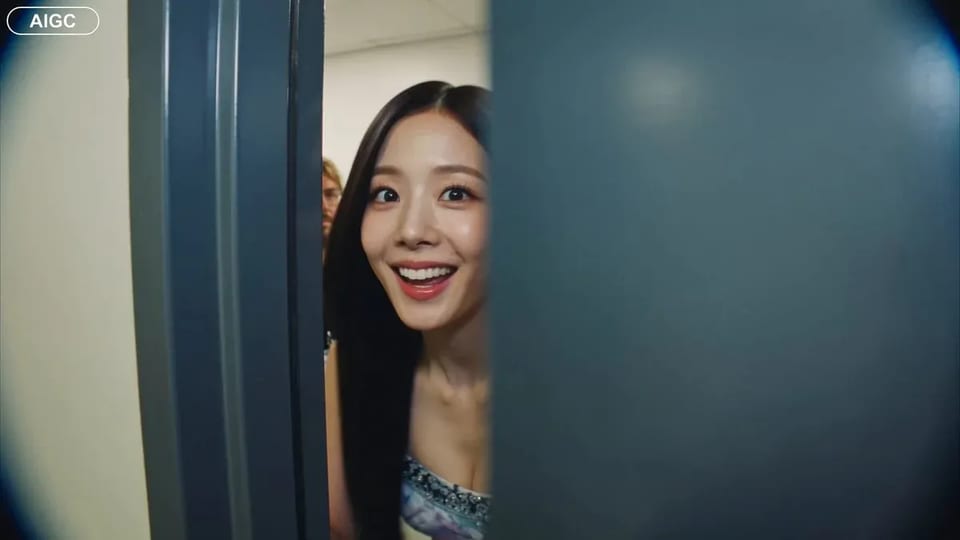
Handheld backstage idol vlog sample

CAMERA: Handheld DV 16mm camcorder aesthetic, first-person/selfie POV. CHASE always holds the camera. Natural hand shake, imperfect framing, delayed autofocus, clumsy zooms, occasional face cropping. The camcorder is never visible. LOOK: Soft vintage DV tape quality with slight blur, subtle tape noise, mild highlight bloom, flickering auto-exposure, muted contrast, natural skin tones. STYLE: Bright, playful K-pop idol vlog. Genuine smiles, eye contact, candid energy, quick handheld shots with backstage excitement. CHARACTER: CHASE, Korean female idol in her 20s. Long straight black hair, dewy skin, elegant Korean features, coral lips, large eyes, slim curvy figure. Wearing a stylish stage outfit with subtle glam makeup and sparkly earrings. SETTING: Backstage hallway of a music show studio with dressing room doors, CHASE's name tag on one door, snack table, overhead PA speaker, and blurred staff passing by. SEQUENCE: 1. Selfie: peeks into the hallway. "Hey guys, we're backstage!" 2. Whip pan down the corridor. "This hallway is so long!" 3. Stops at her dressing room, points at her name tag. "That's me!" 4. Close-up of the name tag as she taps it. Ambient audio only. 5. Quick outfit check with a spin near a mirror. "How do I look?" 6. At the snack table, grabs a snack. "Don't mind if I do." 7. Mid-bite, PA announcement interrupts. She laughs: "Wait—" 8. Selfie ending: hears the countdown, waves, makes a hand heart, then runs toward the stage. "That's my cue—see you after the stage!"

CAMERA: Handheld DV 16mm camcorder aesthetic, first-person/selfie POV. CHASE always holds the camera. Natural hand shake, imperfect framing, delayed autofocus, clumsy zooms, occasional face cropping. The camcorder is never visible. LOOK: Soft vintage DV tape quality with slight blur, subtle tape noise, mild highlight bloom, flickering auto-exposure, muted contrast, natural skin tones. STYLE: Bright, playful K-pop idol vlog. Genuine smiles, eye contact, candid energy, quick handheld shots with backstage excitement. CHARACTER: CHASE, Korean female idol in her 20s. Long straight black hair, dewy skin, elegant Korean features, coral lips, large eyes, slim curvy figure. Wearing a stylish stage outfit with subtle glam makeup and sparkly earrings. SETTING: Backstage hallway of a music show studio with dressing room doors, CHASE's name tag on one door, snack table, overhead PA speaker, and blurred staff passing by. SEQUENCE: 1. Selfie: peeks into the hallway. "Hey guys, we're backstage!" 2. Whip pan down the corridor. "This hallway is so long!" 3. Stops at her dressing room, points at her name tag. "That's me!" 4. Close-up of the name tag as she taps it. Ambient audio only. 5. Quick outfit check with a spin near a mirror. "How do I look?" 6. At the snack table, grabs a snack. "Don't mind if I do." 7. Mid-bite, PA announcement interrupts. She laughs: "Wait—" 8. Selfie ending: hears the countdown, waves, makes a hand heart, then runs toward the stage. "That's my cue—see you after the stage!"

Why a Multi-Model AI Video Generator Beats a Single Tool

An AI video generator is the model behind it — and no single model is best at everything. One generator handles cinematic camera motion but blurs fast action; another renders dialogue lip-sync but caps at six seconds; a third is fast and cheap but soft on physics. Locking yourself in means accepting one set of trade-offs for every brief. AI Image Studio puts every leading AI video generator behind one prompt — switch models with a dropdown, keep your prompt and reference frames, and pick the cut that fits.

How it works

Run the AI Video Generator in Three Steps

From a blank prompt to a downloadable clip — no setup, no separate accounts, no per-model billing.

  1. 1

    Pick a video model from the picker

    Browse the AI video generator catalog in the dropdown — each model carries a clip-length cap and a one-line description so you know which one fits today's brief. Switching is one click; your prompt and reference frame stay loaded.

  2. 2

    Write a prompt or drop a starting frame

    Describe the motion in plain language, or upload a starting frame for image-to-video. Most AI video generators accept JPG, PNG, WEBP references up to 10 MB and produce clips between 4 and 8 seconds.

  3. 3

    Render, compare, download

    Hit generate and the AI video generator queues your clip. Long renders run in the background while you keep working; failed runs refund credits automatically. Paid-plan outputs ship with commercial-use rights.

Who Uses This AI Video Generator

Different models suit different briefs — AI Image Studio lets each user pick the right AI video generator without leaving the page.

  • Content Creators

    Creators generate b-roll, transitions, and concept clips across multiple AI video generators on the same prompt. Veo 3 for cinematic, Seedance for fast variations — one workspace, one prompt, two cuts to pick from.

  • Marketers

    Marketers run paid-social tests across two or three AI video generators to find the one that lands the campaign tone. Side-by-side clips from the same brief shortens the test cycle from a week to an afternoon.

  • Indie Filmmakers

    Filmmakers prototype scenes and storyboard motion with the AI video generator best at the shot type — wide cinematic for establishing shots, fast detail-rich for close action. Switching is a dropdown, not a re-render queue.

  • Educators

    Educators turn lesson stills into short explainer clips with the AI video generator that handles smooth camera motion, then switch to a stylized model for opener animations. One workspace covers the full lesson kit.

What's included

Everything an AI Video Generator Should Ship With

  • Every leading video model in the picker

    The AI video generator picker is the workspace's nervous system. Each entry is a real production model — kept current as providers release new versions.

  • Image-to-video built in

    Every i2v-capable AI video generator in the picker accepts a starting frame: upload a still and the model produces a clip that begins on your image, without re-uploading between models.

  • Premium and standard credits

    Free credits on signup, refreshable via daily check-in. Use them on standard video models; Premium models use subscription or purchased credits.

  • Commercial-use license on paid plans

    Outputs from every AI video generator ship with commercial-use rights on paid plans. The legal page lists exact terms.

  • Prompt + reference history that follows you

    Switch AI video generators and your prompt + uploaded references stay loaded. Iterating across models is a dropdown, not a paste-and-re-upload chore.

  • Automatic refunds on failed runs

    Server errors, model timeouts, content filters — any AI video generator run that fails refunds your credits automatically. You only pay for clips you keep.

Frequently Asked Questions About the AI Video Generator

Is this AI video generator free?

Yes — new accounts get free credits on signup for standard video models. Premium video models use subscription or purchased credits. Video generation costs more credits than image generation (longer compute), but free credits cover several short clips so you can evaluate quality before upgrading.

Which AI video generator should I pick?

It depends on the shot. Veo 3 is the most reliable for cinematic motion and consistent characters across the clip. Seedance 2 is faster and best for short variations and quick iteration. The picker shows badges and clip-length limits so you can choose without leaving the workspace.

Can the AI video generator turn an image into video?

Yes — most models in the picker support image-to-video. Upload a starting frame, describe the motion, and the generator produces a clip that begins on your image. Switch models freely; the reference frame carries across switches.

How long are the generated clips?

Clip length depends on the selected model — most range from 4 to 8 seconds. The picker surfaces the supported lengths when you switch. Chain multiple clips in the workspace to build longer sequences.

Can I use the AI video generator outputs commercially?

Yes — outputs from every model in the workspace ship with a commercial-use license. The legal page lists exact terms.

How does this AI video generator handle failed runs?

Runs that fail mid-generation (server error, content filter, model timeout) refund credits automatically — you only pay for clips you receive. Video runs are queued so the workspace stays responsive while a generation completes in the background.

Open the AI Video Generator Workspace

Free credits on signup, every leading video model under one prompt, commercial-use outputs on paid plans.